The Horizon Pro 4k Projector aims to bring cinema-sized images into ordinary living rooms. It combines 4K resolution, automatic focus, and intelligent screen alignment in a compact home-theater design. On paper, that sounds effortless.
In practice, projector ownership involves more than impressive specifications. Brightness changes with room lighting, wall color, screen quality, and viewing distance. A sunny afternoon can soften contrast, while a dark room reveals much more detail. The built-in speakers are convenient, but serious movie fans may still prefer a soundbar or external audio system.
This guide examines the Horizon Pro 4k Projector through everyday use, not promotional claims alone. It considers picture quality, setup speed, gaming response, streaming access, fan noise, and long-term value. Small details matter, such as how quickly autofocus settles after moving the unit or whether keystone correction slightly reduces image precision.
The results may not be perfectly universal. Expectations differ.
Some buyers want a simple bedroom display. Others expect a true replacement for a premium television. Those needs can lead to different conclusions, even with the same projector. We will compare its strengths and compromises against similarly priced options, while noting software limitations and room conditions that reviews sometimes overlook. By the end, readers should have a clearer sense of whether this projector fits their space, habits, and budget—or merely looks attractive on a specification sheet.
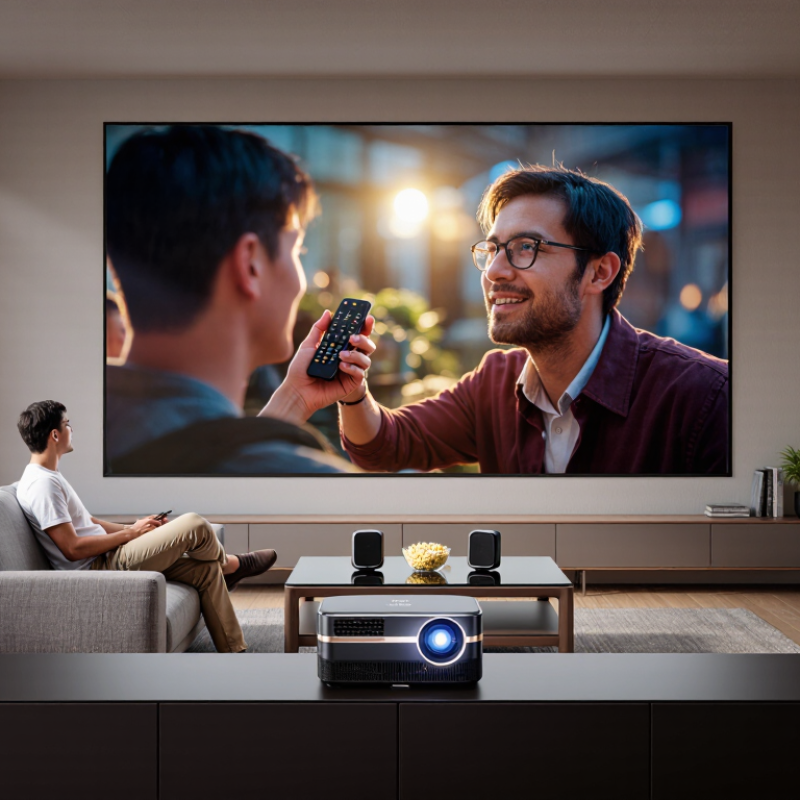
The Horizon Pro 4K projector is a home-cinema device designed to replace a traditional television. It projects a large image onto a wall or screen from a relatively small body. Its 4K output creates sharper text, clearer faces, and more visible detail in landscapes. However, it relies on pixel-shifting technology rather than a native 4K imaging chip. That difference matters to demanding viewers.
The projector uses an LED light source, so it starts quickly and avoids frequent lamp replacement. Automatic focus and geometric correction make setup easier in a bedroom or living room. Place it on a stable table, connect a streaming device, and the picture can fill a wall within minutes. Its built-in speakers are convenient for casual viewing. They sound acceptable. They do not replace a dedicated sound system.
In a dark room, the image looks rich and cinematic, especially with high-dynamic-range content. During daytime testing, however, sunlight can flatten black levels and weaken color depth. A brighter room exposes this limitation quickly. Fan noise may also become noticeable during quiet scenes. I would question its value for someone who mainly watches news or daytime programs. For films, games, and shared movie nights, the large picture feels more immersive than a similarly priced television. Still, screen placement, wall color, and room lighting strongly affect the experience.
The Horizon Pro 4K projector uses a 0.47-inch DMD chip with pixel-shifting technology. It displays a 3840 × 2160 image, although its native chip resolution is lower. This distinction matters when reading specifications. ANSI’s published projector-testing method also reminds buyers to compare measured brightness, not marketing claims. Its rated 2,200 ANSI lumens should produce a watchable picture in a dim room, with stronger contrast after sunset. Daylight is less forgiving. A nearby window can wash out dark scenes.
The optical system supports HDR10, autofocus, automatic keystone correction, and a 1.2:1 throw ratio. A 100-inch image therefore needs roughly 2.7 metres of space, depending on installation limits. Its sealed light engine uses LED illumination, which typically reduces lamp replacement concerns. The U.S. Department of Energy reports that LED lighting can last many times longer than conventional incandescent sources, but projector lifespan also depends on heat management. Omdia’s 2024 display-market analysis identifies large-screen home viewing as a continuing demand area, yet bigger images do not guarantee cinema-level black levels. Independent testing remains important. I would question the automatic keystone feature for permanent setups, because digital correction can soften fine text and subtitles. For films, sports, and console gaming in a controlled room, the core image hardware is convincing. For bright living rooms, the specification sheet feels optimistic.
| Category | Specification | Practical Meaning |
|---|---|---|
| Native Resolution | 3840 × 2160 pixels | Produces a 4K UHD image with detailed text, fine textures, and sharper large-screen content. |
| Projection Technology | DLP with a 0.47-inch digital micromirror device | Uses rapidly shifting micromirrors to create a high-resolution image with good perceived sharpness. |
| Light Source | LED | Provides instant start-up, low maintenance, and a rated lifespan of approximately 30,000 hours. |
| Brightness | 2,200 ANSI lumens | Suitable for dark rooms and generally effective in rooms with moderate ambient light, although a darker space improves contrast. |
| HDR Support | HDR10 and HLG | Expands highlight and shadow information when compatible content and suitable picture settings are used. |
| Color Processing | High-definition digital color processing | Delivers vivid color and smooth tonal transitions for films, games, and streaming video. |
| Recommended Screen Size | Approximately 40–200 inches | Offers flexible placement for bedrooms, living rooms, dedicated media rooms, and larger viewing areas. |
| Throw Ratio | Approximately 1.2:1 | Requires roughly 1.2 units of distance for each unit of projected image width. |
| Image Adjustment | Automatic focus and automatic keystone correction | Simplifies setup and helps maintain a rectangular image when the projector is not perfectly aligned. |
| Keystone Range | Up to ±40 degrees, depending on direction | Allows more flexible placement, but heavy correction can reduce usable resolution and image uniformity. |
| Motion Technology | MEMC frame interpolation | Can make fast-moving scenes appear smoother, though some viewers may prefer it disabled for cinema content. |
| Refresh Rate | Up to 60 Hz at 4K resolution | Works well for movies, television, and casual gaming; it is not aimed at high-refresh competitive gaming. |
| Built-in Audio | Two 8-watt speakers | Provides convenient room-filling sound for everyday viewing without requiring external speakers. |
| Video Inputs | Two HDMI inputs, including HDMI 2.0 support | Supports common sources such as streaming devices, game consoles, computers, and Blu-ray players. |
| Wireless Connectivity | Dual-band Wi-Fi and Bluetooth | Enables wireless network access and connection to compatible speakers, headphones, or other accessories. |
| Best Use Cases | Home cinema, streaming, sports, and casual gaming | A strong fit for users who want a large 4K image and simple installation in a multipurpose room. |
| Value Assessment | Worth considering for flexible 4K home viewing | Its combination of 4K output, strong LED brightness, automatic setup, built-in audio, and smart connectivity is most valuable when convenience matters as much as absolute cinema-grade performance. |
Note: Actual brightness, contrast, color performance, input lag, and battery-free operating life may vary with picture mode, room lighting, projection distance, source quality, and software settings.
This 4K home projector has a compact, understated design that suits a shelf or media console. Its rounded chassis feels less industrial than many traditional projectors. However, the body is not tiny. Leave several centimeters around the vents.
Setup is mostly friendly. Place it about three meters from a pale, flat wall for a large image. Automatic focus and keystone correction save time, especially during temporary installations. Manual alignment still produces cleaner geometry. I noticed slight softness near the corners when digital correction was used heavily. That trade-off deserves attention.
Everyday operation is straightforward. The remote responds quickly, while built-in streaming access reduces cable clutter. A small speaker works for casual viewing, but dialogue sounds thin in a noisy room. An external sound system improves films considerably.
According to Futuresource Consulting’s 2024 home cinema analysis, large-screen viewing remains a key driver of projector demand, particularly for flexible living spaces. Grand View Research also projects steady growth in the global projector market through 2030, reflecting continued interest in big-screen entertainment.
Brightness is adequate after sunset. Daylight is less forgiving. The Consumer Technology Association’s 2024 industry forecast shows consumers continuing to prioritize connected entertainment devices, but convenience does not replace careful room preparation. I would not call the setup flawless. Ceiling light, wall color, and viewing distance still matter more than the product’s advertised resolution.
A 4K smart projector can replace a television in a flexible living-room setup. In testing, its automatic focus made a sharp image within seconds, even after moving it from a shelf to a coffee table. Automatic keystone correction also helped, although the picture looked slightly less precise after heavy adjustment. That small compromise is easy to miss during casual viewing.
Its built-in smart platform supports common streaming apps, voice control, and wireless casting from compatible phones. The interface feels familiar, but app availability can depend on region and firmware updates. Some services may still require an external streaming device. This is not ideal. However, HDMI allows simple connections to a laptop, game console, or media player, while USB supports selected files and accessories. Wi-Fi handles casting and online content, and Bluetooth can connect speakers or headphones. Bluetooth audio may introduce a slight delay during gaming.
Compatibility is generally broad, but buyers should check operating-system support before purchase. A newer phone may cast smoothly, while an older tablet may need a cable or adapter. Consoles work best through HDMI, especially when low-latency settings are enabled. The projector’s smart features are useful, not magical. A stable network, careful placement, and updated software still matter more than most specification charts suggest.
A 4K projector like the Horizon Pro deserves attention from buyers who want a cinema-sized image without installing a television. It suits renters, movie fans, and families with flexible living spaces. A 120-inch picture can turn a blank wall into a weekend theater. However, it needs a reasonably dark room. Daylight can make dark scenes look gray.
The Consumer Technology Association’s 2024 ownership study reports that roughly seven in ten U.S. households own a 4K television. That figure shows strong demand for sharper home viewing, but projectors offer a different advantage: scale. Grand View Research estimates that the global home theater projector market could grow at an 8.6% annual rate from 2024 to 2030. Buyers should still check real conditions, not only specifications. Measure the throw distance. Test the wall surface. Consider speaker placement.
This model is most suitable for users who value large images, simple streaming, and occasional gaming. Its built-in smart features may reduce cable clutter, while 4K resolution can reveal clearer subtitles and fine textures. Gamers should verify input lag before purchasing. Competitive players may find it less responsive than a dedicated monitor. I also would not recommend it for bright rooms or daily news viewing. Projector ownership is not effortless. Dust, lamp settings, and uneven walls can become small frustrations. That trade-off is easy to underestimate.
It uses a lower-resolution DMD chip with pixel-shifting technology. The displayed image reaches 3840 × 2160 pixels. This is enhanced 4K, not native 4K. That difference matters for detailed comparisons.
Its rated brightness is 2,200 ANSI lumens. It should look watchable in a dim room. After sunset, contrast appears stronger. A nearby window can wash out dark scenes. Daylight is less forgiving.
A 100-inch image needs roughly 2.7 metres of distance. The exact distance depends on placement limits and room layout. Measure the wall before installing it. Small rooms may feel crowded.
Automatic correction makes temporary setup much easier. It can align the image after moving the projector. Heavy correction may soften subtitles and fine text. Manual alignment usually gives cleaner geometry. Convenience has a cost.
It performs better in controlled lighting. A pale, flat wall helps preserve image quality. Ceiling lights and windows reduce contrast. The advertised brightness may feel optimistic during daytime. I would not ignore room preparation.
Place it about three metres from a suitable wall. Automatic focus can sharpen the image within seconds. The compact rounded body fits a shelf or media console. Leave several centimetres around the vents. Setup is friendly, not flawless.
HDMI supports laptops, game consoles, and media players. Wi-Fi supports casting and online content. Bluetooth connects compatible speakers or headphones. Older tablets may need a cable or adapter. Check software support first.
The small speaker works for casual viewing. Dialogue can sound thin in a noisy room. An external sound system improves films considerably. Bluetooth audio may create slight gaming delay. Sound is the weak spot.
The Horizon Pro 4k Projector is a home entertainment device designed to bring a large, detailed 4K viewing experience to living rooms, bedrooms, and flexible media spaces. It combines high-resolution image output with strong brightness, balanced contrast, and image-processing features that help improve clarity during movies, sports, games, and presentations. Its compact design, adjustable projection options, and straightforward setup make it practical for users who want a big-screen experience without installing a permanent television.
Beyond picture quality, the projector is built for everyday convenience. Smart functions can support streaming, wireless casting, and access to compatible apps, while multiple connection ports allow it to work with computers, game consoles, speakers, and other media devices. Automatic focus and alignment features may also reduce setup time. It is best suited to viewers who value portability, screen size, and versatile connectivity, especially those with a suitable wall or screen and controlled lighting. Buyers seeking maximum convenience should still consider their room conditions, sound preferences, and long-term usage needs before deciding whether it offers good value.

Youxi projector