Creating a captivating home cinema requires careful selection of a Home Theatre System Projector. The right projector enhances visual quality, making every movie feel immersive. Poor choices can lead to dull images, ruining the viewing experience.
When considering a Home Theatre System Projector, focus on brightness, contrast, and resolution. These aspects significantly affect picture quality. A projector that excels in these areas will deliver vivid colors and sharp details. Conversely, a low-performing projector may disappoint viewers with washed-out colors and fuzzy images.
Pay attention to installation and screen size as well. Projector placement impacts image clarity and sound quality. An incorrectly positioned projector can distort visuals. Moreover, the screen should match the projector's capabilities. Underestimating these details can lead to frustration in setup and enjoyment. Proper research and consideration make a significant difference in achieving that stunning movie experience at home.
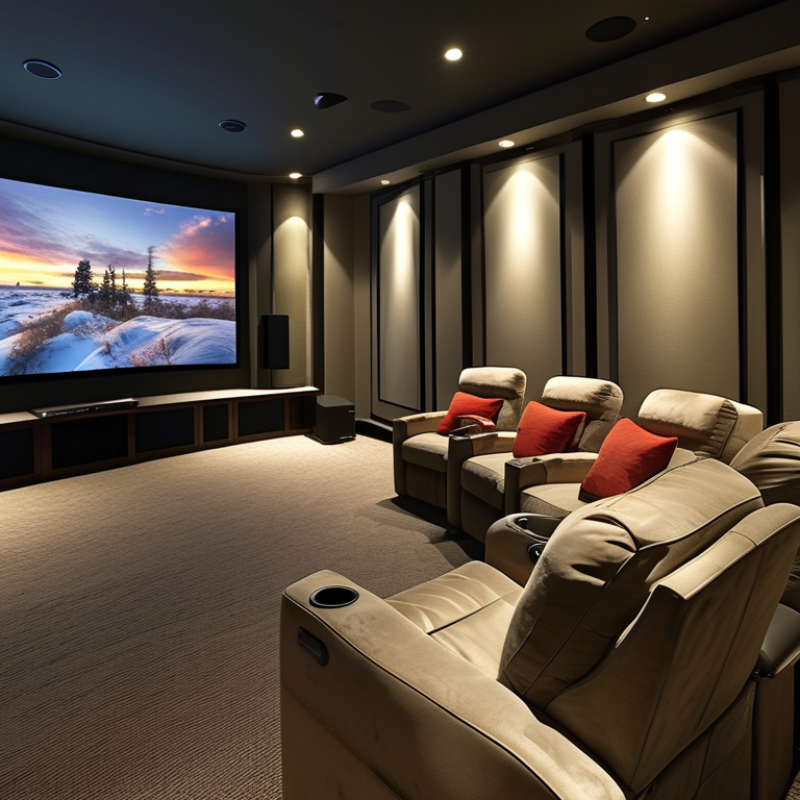
When choosing a projector for your home theatre system, consider the room's brightness. Ambient light can wash out images. A projector with high lumens is essential if your space has many windows. Darker rooms can benefit from lower lumens, allowing for more vibrant colors.
Resolution is another critical factor. 4K projectors provide stunning detail but can be costly. Full HD is a more budget-friendly option, still offering great picture quality. Think about your viewing distance as well. A larger screen requires you to sit farther back. This can affect the experience.
Don't overlook sound quality. Built-in speakers often lack depth. An external sound system can greatly enhance your enjoyment. Adjusting the sound settings to fit your room can also make a difference. Keep in mind that finding the right projector may take some trial and error. Each room is unique, and what works for one may not work for another. Test different settings to see what provides the best experience for you.
This bar chart compares key specifications of different projectors suitable for home theatre systems. Brightness, resolution, contrast ratio, throw ratio, and lamp life are essential factors to consider when choosing a projector for stunning movie experiences.
When setting up a home theatre system, understanding the various types of projectors is essential. You have options like
LCD, DLP, and LCoS projectors, each with unique benefits and drawbacks.
LCD projectors are known for their bright images and vivid colors, but they can struggle with contrast. DLP projectors
often offer better motion handling, making them great for action-packed films, yet their color accuracy may fall
short at times. LCoS projectors combine the best of both worlds but usually come at a higher price point.
Choosing the right projector also involves considering the environment. Bright rooms may require a more powerful
option, while darker rooms enhance the viewing experience. The distance from the screen plays a crucial role too.
A projector may need a specific throw distance to display optimal images. Don't forget about the screen itself;
its size and material can impact overall quality. Remember, providing a slightly imperfect setup can lead to an
engaging atmosphere, as perfect clarity isn't always necessary for enjoyment. Reflect on these aspects before
deciding; your unique space and needs should guide your choices.
When selecting a home theatre projector, understanding essential features is crucial. Start with brightness, measured in lumens. A projector with at least 2000 lumens is ideal for viewing in well-lit rooms. This will ensure that your movies remain vibrant, even with some ambient light. Contrast ratio also matters. A higher ratio enhances the difference between dark and light scenes, providing a more immersive experience.
Resolution is another key factor. Aim for at least 1080p. For even crisper images, consider 4K options. This clarity elevates the viewing experience, allowing you to catch fine details that you might otherwise miss. Don't overlook throw distance. Make sure the projector fits your room size. A projector that’s too far away or too close can distort the image.
When choosing your projector, consider the distance. Measure from the screen to the projector's location. It’s a common oversight. Many neglect to account for the room layout. Look into features like lens shift, which helps adjust the image without moving the projector. If you value sound, built-in speakers might not suffice. External sound systems generally provide a much richer audio experience.
Setting up your projector correctly can transform your movie-watching experience. First, consider the room's lighting. A darkened room improves picture quality significantly. Use blackout curtains to block outside light. Position the projector at the right distance from the screen. This ensures the image fits perfectly without distortion. A test screen can help you gauge the ideal placement.
Sound quality plays a vital role too. Invest in a good sound system that complements your projector. Speakers should be positioned at ear level for the best audio. Surround sound enhances immersion, making you feel like you're part of the action. Remember to adjust the sound settings on your projector. Occasionally, this process requires trial and error to find what works best.
Lastly, look into calibrating your projector. Adjust brightness, contrast, and color settings to match your environment. Each room has its unique characteristics. Some may absorb sound while others amplify it. Document your settings for future reference. This way, you can always revert to an optimal configuration if needed. Keep experimenting with different setups until you find the ideal combination. A little patience can lead to significantly better results.
Creating the perfect home theatre environment for movie nights is essential for a great viewing experience. Proper lighting is crucial. The American Society of Interior Designers suggests that a combination of ambient and task lighting enhances the overall atmosphere. Dim the lights to create a cinematic feel, yet avoid complete darkness. This can prevent eye strain and enhance visibility of the screen without overwhelming brightness.
Screen size and placement significantly affect your viewing pleasure. Studies indicate that the ideal viewing distance from the screen should be about 1.5 to 2.5 times the diagonal screen size. Position your projector or television at eye level for optimal comfort. This may take adjustments and testing. The size of your room plays a vital role. A small room can limit screen size choices, making it challenging to achieve the desired visual impact.
Sound quality is another crucial aspect. According to the Consumer Technology Association, a surround sound system can elevate your movie experience significantly. Acoustic treatment is often overlooked. Soft furnishings can absorb sound. Reflective surfaces can cause echoes, distracting the viewer. Thus, consider adding rugs or curtains. Setting up a well-balanced audio-visual space requires both initial investment and continuous tweaks, which can be frustrating but ultimately rewarding.
| Aspect | Recommendation | Notes |
|---|---|---|
| Screen Size | 100-120 inches | Optimal size for a cinematic experience in most rooms. |
| Resolution | 4K | Provides sharp images and detail, especially for large screens. |
| Brightness | 2000 Lumens or more | Ensures visibility in rooms with ambient light. |
| Audio Quality | Surround Sound System | Enhances immersion in movies. |
| Room Layout | Darkened Room | Improves picture quality and reduces distractions. |
| Seating Arrangement | Recliner Seats | Provides comfort during long movie sessions. |
| Connectivity | HDMI inputs | Allows connection to multiple devices. |
| Projector Type | DLP or LCD | Both provide excellent quality; choice based on preference. |
: Look for a projector with high lumens. At least 2000 lumens is ideal.
At least 1080p is recommended. For better detail, consider 4K projectors.
The projector's throw distance is crucial. Measure from the screen to determine the right placement.
Built-in speakers often lack depth. Using an external sound system enhances audio experience.
Combine ambient and task lighting. Dim lights for a cinematic feel, but avoid complete darkness.
Position the projector at eye level. This may require adjustments for comfort.
Yes, adding rugs or curtains can absorb sound. This prevents echoes and distractions.
Check throw distance and adjust the image settings. Lens shift feature can help too.
Yes, finding the perfect setup can require trial and error. Each room is unique.
Regular adjustments are recommended. Small changes can greatly enhance your viewing experience.
Creating a captivating movie experience at home relies heavily on selecting the right Home Theatre System Projector. It’s essential to understand the various types of projectors available, such as LCD, DLP, and LCoS, each offering unique advantages for your viewing pleasure. When choosing a projector, key features like resolution, brightness, and contrast ratio should be prioritized to ensure stunning visuals.
Once you have the ideal projector, setting it up properly is crucial for maximizing both picture and sound quality. Alongside the technical setup, the environment plays a significant role; controlling lighting and optimizing seating can significantly enhance your movie nights. By focusing on these aspects, you can create a fantastic home theatre environment that transforms your living space into a cinematic haven.

Youxi projector