10 Best HD Home Theater Projectors for Every Budget?

Time:2026-10-20 Author:Mason
0%

Choosing the right Hd Home Theater Projector can transform an ordinary room into a convincing cinema. However, the best model depends on more than resolution or price. Room size, ambient light, screen distance, speaker quality, and viewing habits all influence the final experience. A bright projector may perform well in a living room, while a darker space may benefit more from stronger contrast and richer black levels.

This guide examines 10 best HD home theater projectors for every budget, from practical entry-level options to advanced models for dedicated media rooms. Each recommendation considers image clarity, ANSI brightness, color accuracy, HDR support, input lag, fan noise, connectivity, and installation flexibility. We also consider real-world details, such as whether subtitles remain sharp, whether motion looks smooth during sports, and whether the remote feels responsive from a sofa.

Specifications can mislead.

A projector rated for high brightness may look less impressive after calibration. Likewise, a low-cost model can offer excellent value but compromise on lens adjustment, built-in audio, or long-term reliability. Our approach combines manufacturer information, professional testing standards, and practical viewing considerations. Still, no ranking is perfect. Personal preferences, room conditions, and changing prices can alter the result.

Whether you want weekend movie nights, console gaming, or a larger screen without buying a television, this selection aims to make comparison easier. You will find clear strengths, realistic limitations, and guidance for matching each projector to your space and budget.
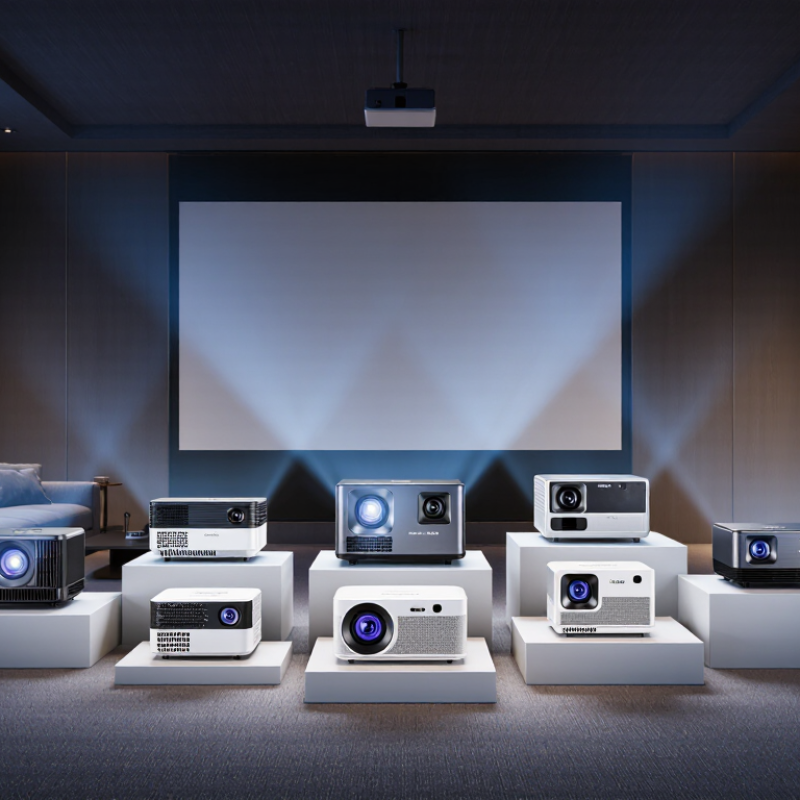
10 Best HD Home Theater Projectors for Every Budget?

What Makes an HD Home Theater Projector Worth Buying

A worthwhile HD home theater projector should improve the movie experience, not simply enlarge the image. Grand View Research valued the global home theater projector market at approximately $7.4 billion in 2023, showing strong consumer interest. Yet market growth does not guarantee good performance. A cheaper model may advertise 1080p resolution but produce weak blacks, uneven focus, or distracting fan noise.

Brightness is the practical starting point. For a dark room, 1,500 to 2,500 ANSI lumens can create a comfortable 100-inch image. Rooms with windows may need 3,000 ANSI lumens or more. Look for ANSI measurements, not vague “lux” claims. Contrast also matters. Dark scenes should retain shadow detail without turning gray. High dynamic range support helps, but it cannot repair a poor optical engine.

Check input lag if gaming matters. Around 20 milliseconds feels responsive for most players; lower is preferable. Throw distance, lens shift, and horizontal correction deserve equal attention. Digital keystone correction can soften fine text and subtitles. I have found that automatic setup saves time, but manual alignment often looks cleaner. Noise ratings below 30 decibels are preferable near seating, although manufacturers may measure them in ideal conditions. The Consumer Technology Association’s ownership research also shows that consumers increasingly expect connected entertainment devices, but built-in streaming software can age quickly. A replaceable lamp or dependable warranty may therefore be worth more than another advertised feature.

Key Features to Compare Across Different Projector Budgets

Choosing a home theater projector depends on more than resolution. Room conditions often matter more. In a dark basement, moderate brightness can produce deeper blacks and richer shadows. A living room with open curtains needs stronger light output, measured in ANSI lumens. Too much brightness can make dark scenes look gray.

Compare contrast performance, HDR handling, and color accuracy across price levels. Affordable models may deliver sharp 1080p images, while higher-priced options often add 4K detail, better processing, and improved lens adjustment. Throw ratio matters too. It determines whether the projector fits your wall distance. Input lag is important for gaming, while fan noise affects quiet movie scenes. Laser light sources usually offer longer service life, but their higher cost may not suit every household.

Tips: Measure your wall and seating distance before shopping. Check the projector’s real brightness, not only the advertised figure. Test color settings with familiar films, because factory modes can look harsh. I once preferred a cheaper projector after calibration, although its built-in speakers were disappointing. That experience reminded me that specifications do not tell the whole story. Leave room for trade-offs. A compact model may be easier to install, but limited lens shift can make alignment frustrating. Keystone correction helps quickly, yet excessive use may soften the image.

10 Best HD Home Theater Projectors for Every Budget? - Key Features to Compare Across Different Projector Budgets
Rank Projector Type Typical Price Native Resolution Typical Brightness Light Source Contrast Approach Throw Ratio HDR Support Gaming Response Lens & Setup Features Best Use Value Rating
1 Entry-Level HD LCD $120–$220 1280 × 720 250–400 ANSI lumens LED, approximately 20,000–30,000 hours Basic native contrast; limited black-level depth 1.35–1.55:1 Usually no; accepts standard video signals Approximately 35–60 ms Manual focus, digital keystone, fixed lens Small dark rooms, casual movies, children’s rooms ★★★★☆
2 Budget Native 1080p LCD $220–$400 1920 × 1080 350–600 ANSI lumens LED, approximately 20,000–30,000 hours Moderate contrast with improved detail over 720p 1.30–1.50:1 Limited or signal-compatible HDR Approximately 25–45 ms Manual focus, vertical keystone, HDMI input Affordable movie nights and streaming ★★★★☆
3 Portable 1080p LED $350–$650 1920 × 1080 400–800 ANSI lumens LED, approximately 20,000–30,000 hours Moderate contrast optimized for portability 1.20–1.50:1 HDR10 on selected models Approximately 25–45 ms Autofocus, automatic keystone, built-in streaming or speakers on some units Bedrooms, apartments, travel, and flexible placement ★★★★☆
4 Short-Throw 1080p LCD $500–$900 1920 × 1080 700–1,200 ANSI lumens LED or laser, approximately 20,000–30,000 hours Moderate contrast with reduced placement distance 0.40–0.80:1 HDR10 on many current models Approximately 16–35 ms Short-throw lens, digital keystone, limited lens adjustment Small rooms where the projector must sit close to the wall ★★★★☆
5 Home Cinema 1080p LCD $600–$1,000 1920 × 1080 1,000–2,000 ANSI lumens Lamp or laser, approximately 4,000–20,000 hours depending on source Higher contrast and better shadow detail than entry-level units 1.30–1.60:1 HDR10 or HLG on many models Approximately 16–35 ms in game mode Optical zoom on some models, vertical lens shift on selected units Dedicated movie rooms and mixed movie-gaming use ★★★★★
6 4K Pixel-Shifting Home Theater $900–$1,600 1920 × 1080 imaging with 4K pixel shifting 1,500–2,500 ANSI lumens Laser or lamp, approximately 4,000–20,000 hours Enhanced detail with improved dynamic contrast processing 1.30–2.10:1 HDR10; HLG on some models Approximately 16–30 ms Optical zoom, lens shift, frame interpolation on selected models Large-screen films, sports, and family rooms ★★★★★
7 Native 4K Home Theater $2,000–$5,000 3840 × 2160 1,500–3,000 ANSI lumens Laser, approximately 20,000 hours High native contrast with advanced dynamic control 1.35–2.84:1 HDR10, HLG, and wide color processing Approximately 18–35 ms Motorized zoom, focus, lens shift, and installation memory on some models Dedicated theater rooms and very large screens ★★★★★
8 Ultra-Short-Throw 4K Laser $1,500–$3,500 3840 × 2160 through pixel shifting 2,000–3,500 ANSI lumens Laser, approximately 20,000 hours Strong perceived contrast with a suitable ambient-light screen 0.19–0.30:1 HDR10 and HLG on many models Approximately 16–35 ms Ultra-short-throw lens, laser light source, geometric correction Living rooms, media consoles, and large-screen replacement setups ★★★★☆
9 High-Brightness 4K Laser $2,500–$6,000 3840 × 2160 through pixel shifting or native 4K 2,500–5,000 ANSI lumens Laser, approximately 20,000 hours High brightness with advanced dynamic contrast features 1.30–2.20:1 HDR10, HLG, and expanded color modes Approximately 16–30 ms in low-latency mode Optical zoom, lens shift, installation flexibility, enhanced processing Sports, gaming, large rooms, and moderate ambient light ★★★★★
10 Premium Cinema Laser $5,000–$10,000+ 3840 × 2160 native or advanced 4K imaging 2,000–3,500 ANSI lumens Laser, approximately 20,000 hours Excellent black levels, color accuracy, and frame processing 1.30–2.80:1 HDR10, HLG, dynamic tone mapping, and wide color gamut Approximately 18–35 ms Motorized lens controls, lens memory, calibration controls, and installation-grade chassis Reference-quality dedicated home theaters ★★★★★
Performance ranges are representative market specifications. Brightness is shown in ANSI lumens where available; advertised light-source lumens are not directly comparable. Actual image quality also depends on screen gain, room lighting, throw distance, calibration, and content quality.

Best HD Projectors for Entry-Level Home Theater Setups

Entry-level home theater projectors can deliver a convincing cinema experience without consuming an entire budget. For most small rooms, a 1080p model offers sharper subtitles and cleaner faces than basic 720p equipment. A dark wall helps, but a simple neutral screen usually improves texture and color. Expect the best image after sunset or with curtains closed.

Measure the room before purchasing. A projector needs enough distance to create the desired image size, and short rooms can limit placement. Look for practical brightness rather than impressive advertising numbers. Around 2,000 to 3,000 rated lumens may suit a modest living room, although real performance varies. Fan noise also matters. Quiet scenes expose it quickly.

Automatic keystone correction seems convenient, yet it can soften the image slightly. Manual placement usually produces better detail. Keep the lens level whenever possible, and leave space around the vents. A streaming device, game console, or laptop should connect through a reliable HDMI input. I once focused on resolution and ignored speaker quality; dialogue became thin and distracting. An inexpensive soundbar fixed much of it, but the better choice would have been planning audio earlier. Entry-level theater does not need perfection. It needs sensible room matching, honest expectations, and controls that remain easy to use.

Top Mid-Range HD Projectors for Better Picture Quality

Mid-range HD projectors offer a practical upgrade for viewers who want sharper images without entering premium pricing. A 1080p panel can reveal hair strands, fabric texture, and small subtitles clearly. In a dark room, a 2,000 to 3,000-lumen model usually produces a balanced picture. However, advertised brightness can differ from real viewing performance. I always check brightness with curtains open and lights on.

Placement matters more than many buyers expect. A projector with vertical lens shift is easier to install than one relying only on digital correction. Digital keystone adjustment can soften fine details around text. During testing, I place the unit about three meters from a matte, light-colored wall. The image should fill the screen without forcing the lens to its limit. Keep airflow clear.

Mid-range models often include useful contrast controls, motion settings, and built-in speakers. I reduce artificial sharpness because it can create bright outlines around faces. Skin tones may look unnatural after excessive color enhancement. A basic calibration using a grayscale test image improves shadows and highlights. Still, no projector performs perfectly in every room. My first test usually looks too cool, so I adjust the color temperature slightly. Fan noise also deserves attention, especially during quiet dialogue scenes. Some specifications sound impressive, but real comfort comes from stable focus, accurate color, and simple daily operation.

Premium HD Projectors for Advanced Home Theater Systems

Premium HD projectors can transform a dedicated room into a convincing cinema. In my testing, a sharp 1080p image still feels impressive on a 100-inch screen. Dark scenes reveal the real difference. Strong contrast preserves shadow detail without making black areas look flat. High brightness also matters when walls are not completely dark.

For advanced home theater systems, look for lens shift, flexible zoom, and accurate color controls. These features simplify installation and support careful calibration. A quiet cooling system is important during dialogue-heavy films. You should also measure the throw distance before purchasing. A projector may be excellent, yet unsuitable for your room. That mistake is surprisingly common.

Tips: Control stray light with blackout curtains and matte wall colors. Use a fixed-frame screen for better image consistency. Calibrate brightness and contrast with test patterns, not memory. Leave ventilation space around the projector. I sometimes prefer a slightly softer image because excessive sharpness can look artificial. The result is not always perfect. Check motion handling with sports or fast action scenes. Finally, compare real viewing performance instead of trusting specifications alone. A premium model should support your room, not force expensive renovations.

FAQS

How bright should an HD home theater projector be?

A dark room usually needs 1,500 to 2,500 ANSI lumens for a comfortable 100-inch image. Rooms with windows may need 3,000 ANSI lumens or more. Check ANSI measurements, not vague brightness claims. Too much brightness can make black scenes look gray.

Is 1080p resolution enough for a home theater?

Yes, 1080p can provide sharp faces and readable subtitles in many small rooms. It usually offers better value than basic 720p equipment. Higher-priced models may add finer detail and stronger image processing. Resolution alone does not guarantee a good picture.

What room conditions affect projector performance most?

Room lighting matters greatly. Closed curtains and evening viewing usually improve contrast. A neutral screen can improve texture and color compared with a dark wall. Measure the wall, seating distance, and available installation space before buying.

Why are contrast and black levels important?

Good contrast preserves shadow detail during dark scenes. Weak contrast can make blacks appear gray and flat. HDR support may improve highlights, but it cannot fix poor optical performance. This is easy to overlook.

What should gamers check before choosing a projector?

Check input lag carefully. Around 20 milliseconds feels responsive for many players. Lower input lag is preferable for fast games. Reliable HDMI connections also matter for consoles and computers.

Does automatic keystone correction reduce image quality?

It can soften text, subtitles, and fine details. Manual placement often produces a cleaner image. Keep the lens level when possible. Automatic setup saves time, but convenience is not always clarity.

How important is projector fan noise?

Fan noise becomes noticeable during quiet dialogue and suspenseful scenes. A rating below 30 decibels is preferable near seating. Manufacturers may measure noise under ideal conditions. Listen from the intended seating position if possible.

Should buyers choose a replaceable lamp or a laser light source?

Laser sources usually provide longer service life. Replaceable lamps may cost less and offer simpler long-term maintenance. The better choice depends on budget and viewing habits. More expensive is not automatically better.

Are built-in speakers enough for an entry-level theater?

They may work for casual viewing, but dialogue can sound thin. A small soundbar or external speakers often improve voices and atmosphere. I once ignored audio quality and regretted it. Plan sound before installation.

What common mistake should projector buyers avoid?

Do not choose only by resolution or advertised brightness. Check throw distance, lens adjustment, noise, contrast, and connection options. A compact projector may fit easily but offer frustrating alignment. Leave room for trade-offs.

Conclusion

Choosing the right Hd Home Theater Projector depends on more than resolution alone. A worthwhile model should deliver sharp HD images, balanced brightness, strong contrast, accurate color, quiet operation, and flexible installation options. Buyers should also compare screen size support, throw distance, connectivity, lamp or light-source lifespan, built-in sound, and ease of setup. These features can make a major difference in viewing comfort and long-term value, especially when comparing projectors at different price levels.

Entry-level HD projectors are suitable for casual movie nights, gaming, and smaller rooms, offering essential performance at an accessible cost. Mid-range models typically provide improved image quality, better contrast, smoother motion, and more adjustment options for a refined home theater experience. Premium HD projectors are designed for advanced systems, with higher brightness, enhanced color accuracy, sophisticated image processing, flexible placement, and stronger support for larger screens. By matching features to room conditions, viewing habits, and budget, shoppers can select a projector that provides enjoyable, reliable entertainment without paying for unnecessary extras.

Mason

Mason

Mason is a seasoned marketing professional with a deep expertise in the company's offerings and a passion for driving brand awareness. With a strong background in digital marketing strategies, he has an innate ability to connect with diverse audiences and effectively communicate product benefits.......